V I D Y M

Loading

Vidym is a complete school management system — attendance, fees, exams, transport, library, visitor management and parent communication on one simple platform built for Indian schools.
Frequently Asked Questions

Straight answers on setup, fees, the parent app, the school day, transport, data, pricing and support — including where the answer is no.

Still have a question?

Call or WhatsApp +91-9816128313, write to hello@vidym.com, or book a demo — we answer within one working day.

Contact Us
GENERAL

About Vidym

Vidym is a cloud-based school management software (school ERP) for Indian schools. It brings admissions, attendance, fee collection with online payments, exams and report cards, timetable, transport and fleet, library, store, visitor management, staff attendance and leave, and parent communication into one system, with separate logins for the principal, office, accounts, teachers, transport, library, reception and parents.

Play schools and pre-primary (such as Vedanta Toddlers), K-12 schools (such as Arbour Grove School) and schools with large transport operations (such as Shemford Futuristic School, Barara). Multi Branch plans serve school groups and trusts with several campuses.

Cloud-based. It runs in any modern browser and in the Vidym apps. There is nothing to install, nothing for you to back up and no server to keep running at the school; a basic internet connection in the office is the only requirement. Multi Branch groups can optionally run on a dedicated server under their own domain.

Espy Technologies, in India. Vidym is our own product — designed, built, hosted and supported by us — so a change your school needs does not travel through somebody else’s roadmap.

Yes. Parents use the Vidym app on Android. Teachers, transport in-charges and bus crew use the Vidym Staff app to mark registers, post homework, enter marks, apply for leave and message a route’s parents. The principal and office screens work on a laptop or tablet browser.

No, deliberately. A fee worksheet, a timetable grid and a class of forty children are not phone-shaped. Office work stays in the browser on a wide screen; the apps carry the things people do while standing up — registers, homework, marks, bus boarding, gate passes and calls to parents.
SETUP & DATA

Getting started

Your school account is activated in minutes and is usually live the same day. Classes, sections, subjects, fee heads, the fee structure and the current session are configured in one sitting; students and staff are imported from your existing Excel files. Setting up a school is configuration, not a build, so there is nothing to wait for. Most schools are marking attendance and issuing receipts on the first day, with a dedicated account manager guiding the setup.

Yes. Vidym imports students and staff from Excel (.xlsx) or CSV with column mapping and a preview before anything is committed, so you see exactly what will land and can correct it first. Missing classes and sections are created on the way in. If your records are on paper, we will tell you honestly how much typing is involved.

Yes. There is a dedicated importer for the earlier Vidym database that brings students, fee plans, receipts, the attendance register, staff and photographs across as a background job, with a preview first. Your account manager runs it with you.

You keep them. Vidym records a manual receipt number against every payment, so you can carry on your existing receipt book series instead of restarting at one and confusing your auditor. Admission-number and employee-code prefixes and starting numbers are yours to set, and your naming stays yours: if your sections are called Discover and Explorer rather than A and B, that is what Vidym shows.

No. Vidym is designed for the school office: a clerk, an accountant, teachers and the principal. Your account manager trains your staff at onboarding, and a setup checklist on the dashboard tells you what is still missing and where to fix it. Nothing about it needs a computer background.

No. Setting your school up, importing your data and training your office and teachers are part of onboarding, not a separate implementation bill. Your dedicated account manager is included on every plan.

One operation. Rollover copies your class structure, subjects, fee schedule, concessions and transport routes into the new session and promotes every child — with a preview first, so you see exactly what will happen before it happens. Every previous session stays readable. Class-teacher assignments and the timetable are not carried forward, because a new year needs new ones.
FEES

Fees and payments

Yes, and it calculates rather than asks. Fee heads are defined per class, named concessions apply to the specific heads you choose, and instalments, late fees and transport fares follow from the structure. Each child has a fee worksheet with every month of the session on screen, so a special case is edited once and stays on record. Two clerks cannot produce two different figures for the same child.

Yes. Easebuzz and PayU are live today, with UPI, cards and net banking through the gateway’s own secure page. Razorpay, ICICI, HDFC and SBI can be configured and are being completed — ask us where a specific bank stands before you commit to it. Only one gateway is active at a time, and it is set per school, so branches in a group bank separately.

In the same place as cash at the counter. An online payment is written through the very same receipt method the office uses — the same receipt series, the same day’s collection, the same reports — so there is no second set of books to reconcile at month end. The parent gets an instant receipt in the app and a payment confirmation on their phone.

Online, no: whole instalments only, oldest first, and the amount is always computed by the server, never by the app. The ledger settles oldest-first, so a part payment would land somewhere the parent did not choose. At the counter your clerk has the full ledger in front of them and can take what a family actually hands over.

Vidym does not add a fee. The payment gateway charges its own transaction fee, settled directly between the gateway and your school. If you pass a convenience fee on to parents, Vidym shows it to them before they pay and keeps it out of your fee income.

It can be cancelled, and cancelling asks for a reason. The original stays visible with its details rather than disappearing, a fresh receipt is issued, and a Cancelled Transactions report lists every one by month and class. Nothing is deleted, so the ledger still explains itself to an auditor two years later.

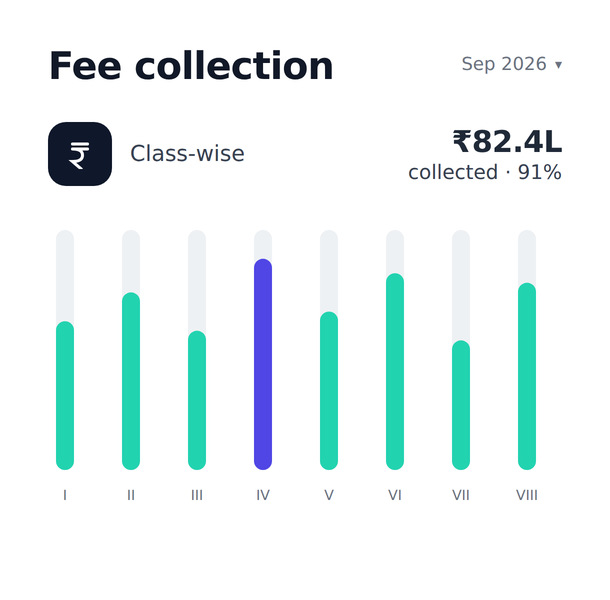
Yes, at any moment: collected today and by which instrument, collection month by month, outstanding by class, who is behind and for how many months, every receipt this session, fees waived and why, and who holds which concession. The principal’s dashboard carries the collection and defaulter figures, and each opens to the list of children behind it.

Yes. One button on the defaulters report notifies those families through the app. Every family the report matched is put back through the report’s own arithmetic before anything sends, so anyone who has paid in the meantime is dropped. The notification carries no amount, because a figure worked out an hour ago would sit on a lock screen all day after the family paid; the ledger is one tap away and is always right.

Yes. Daily expenses get a numbered voucher with a head, payee or supplier, payment mode and amount, and advances to staff are totalled per person. Payroll itself is not part of Vidym.
COMMUNICATION

Parents and the app

Yes. Parents get the Vidym app on Android, free to download. Attendance, homework, notices, results, fee receipts, payment confirmations, bus alerts and the honours board reach them as app notifications, which carry no per-message cost to the school however many families you notify. An iOS release is being prepared.

With a code the school prints for them: the school’s four-character code followed by the child’s admission number, and the child’s date of birth as the first password. There is no registration to complete and no email to verify. A family with several children at the school signs in once and switches between them, so nothing is ever shown under the wrong child’s name.

Attendance with a monthly trend and the actual absent dates; classwork and homework with attachments; the notice board, current and past; the fee ledger with a per-head breakup, every receipt and a downloadable receipt PDF; online payment; every exam’s marks with a report-card PDF and the teachers’ progress ratings; the exam datesheet and school calendar; the photo gallery and honours board; and the child’s profile with the bus route, stop and a tap-to-call transport contact.

Yes, and Vidym shows the half that is useful: who has not opened it. Homework, notices and honours each show how many handsets were reached and which families have opened them, so a class teacher knows exactly whom to follow up before a PTM or an important circular.

No. A notification in Vidym is a reference to something that happened, and the record is read again at the moment of sending. Mark a child absent, notice the mistake before break, fix it — nothing leaves the building. A fee settled at the counter cancels its own reminder, unsent. Anything triggered by a button is de-duplicated per day, because buttons get pressed twice. None of this is a setting you have to find.

Everything the app shows is also on screen in the office to read out or print: the fee ledger, the receipt, the report card, the notice. Parent-app credential sheets are printed per class, so a family that gets a phone later joins in a minute. For families who must be reached by text, see the next question.

Not as part of the standard product. Vidym delivers notifications to the app instead, which is why there is no per-message cost built into anybody’s price: a school notifying two thousand families a day pays the same as one notifying none. Where a school needs SMS or WhatsApp for specific families, we quote it separately as a custom integration.

Parents can raise a query from the app — a fee question, a complaint, a request — and the office replies in Vidym, with the reply reaching their phone. Leave application from the app is not released yet; a leave recorded by the office already pre-fills the register, so a child on agreed leave is never marked absent by mistake.

Not yet. The app is built for translation from the first screen, so adding Hindi is translation work rather than engineering; it is on the list. Today the apps are in English.
DAY TO DAY

Attendance, academics and the school day

Seconds. Your school sets a default — everyone present, or everyone absent — and the register opens that way, so the ordinary day is marking the few who are away and saving. A child whose family applied for leave already shows as on leave. Teachers do it from the staff app in front of the class, and the office can see at once which registers have not been taken.

The office presses one button on the absentees report and every family of a child marked absent that day is notified in the app. The register is read again at send time, so a child corrected to present twenty minutes later generates nothing. The message carries the date and the class, never another child’s name.

Yes. Assign a teacher to a period they are already teaching elsewhere and Vidym refuses the save rather than accepting it quietly. Bell timings switch between summer and winter in one step, each teacher sees their own week on their phone, and the office can see who is free in any period.

Yes. Grade bands, exam schemes, a datesheet builder, marks entry by teachers, and report cards for one child or a whole section in one print run. Parents receive the same report card as a PDF in the app. Previous sessions stay intact, so a child’s record follows them up the school.

Yes. A teacher enters marks subject-wise down their own roll in the staff app, marks absentees as absent rather than zero, and can print the class sheet. Teachers see only the sections they teach; the school can allow one person to enter marks for every class if that is how it works.

Yes. The class performance view puts every child and every subject of one exam on one screen, section against section, with the grade spread. The same class on the same syllabus, several points apart, is a teaching conversation rather than a marking one. Academic insights rank the weakest subjects and classes first and show attendance against marks.

Yes. For each exam sitting, subject and class teachers rate every child on conduct, work and participation on a scale whose rungs your school defines. Children whose ratings need attention appear on a report, and parents see the ratings in the app if the school chooses.

Yes. A daily staff register split teaching and non-teaching, monthly totals per person, and staff leave with apply, approve or reject, and withdraw. Nobody decides their own leave, the decision reaches the teacher’s phone, and pending leave sits on the principal’s dashboard. Biometric devices are not integrated as standard; we quote that per school.

Yes, included in every plan. Reception or gate staff log every visitor with a photograph and a purpose — admission enquiry, complaint, feedback, early pickup, meeting a staff member or other — and route the visit to a host, who is notified and records remarks and the outcome. Returning visitors are recognised by mobile number, a badge can be printed, and the principal has a live board of who is on campus and a monthly visitor register. Admission enquiries are captured with the child’s details for the office to follow up.

The person collecting the child is checked against the guardians the school has on record, and releasing the child issues a gate pass with the collector’s photograph, printed in two parts for the school and the gate. The Early Bird register shows who left early, why and with whom.

Yes. The library holds titles with individually numbered copies, issues and returns by accession number to students and staff, and lists overdue books with the classroom to find the child in, with fines computed from your policy. The store keeps a stock register with suppliers, deliveries, issues, returns and adjustments, and flags what is running low.
TRANSPORT

Transport and fleet

No. There is no GPS tracking and no live position on a map, and it is not on our roadmap. We would rather say so plainly than sell you something we do not have.

Everything around the fleet: routes and stops with pickup and drop times, fares that feed the fee structure so transport is billed on the tuition receipt, a roster of exactly who rides each route, the bus register marked at the stop for each leg, a fleet register with certificate expiry alerts (registration, fitness, insurance, permit, pollution, road tax), service history with next-due, and crew recorded as dated spells so you can answer who was on that bus in July.

Yes. From the staff app, in one message, optionally with a photograph, reaching every parent on that route and nobody else. It is the only notification in Vidym whose wording a person types, and it can be retracted in the moments before it goes out.

Yes; this was built for precisely that case. A third-party driver or attendant gets their route, its riders and the bus register, and nothing else about the school — not fees, not other classes, not the student roll. A transport in-charge gets route and rider figures and manages transport staff only. It is enforced on the server rather than by hiding a menu, and transport logins cannot be granted school rights at all.

No, and Vidym keeps them separate on purpose. A child can be present in class and never have boarded, because a parent drove them. The two figures disagreeing is normal, and the screen says so.

The child’s route, stop and whether they travel one way or both, with the route’s contact number to tap and call, on the child’s profile in the app. Route notices from the crew arrive as notifications.
SECURITY

Data, access and security

Yes, at the level of individual rights rather than broad job titles. Start from a role template — Principal, Accountant, Class Teacher, Librarian, Front Office, Transport In-charge — and adjust per person. An accountant sees money; a class teacher sees their own sections and nobody else’s; a teacher’s dashboard never shows the school’s collections. Every action is authorised again on the server, so hiding a menu is not what keeps somebody out.

Nothing is hard-deleted. Removing a record hides it and keeps it, and an audit trail records who changed what, when and from where. A cancelled receipt, a removed student, a changed fee amount — all still have an answer two years later.

Your school owns its data. Every report and register downloads to Excel-readable files and prints or saves as PDF, and a full copy of your data is provided on request whether or not you are staying with us. We will not hold your records against a renewal.

Vidym runs on secured cloud servers over encrypted HTTPS connections. Each school’s data is separated at the database layer, so one school can never see another’s. Passwords are stored hashed, sign-in is rate-limited and accounts lock after repeated failures, payment gateway credentials are encrypted and never shown back to anyone, and uploaded photographs and documents are served only to signed-in users who are entitled to them. Parents see only their own children.

Logins are issued automatically when somebody joins the staff register. A staff username is your school’s code, E and the employee number — for example VEDAE42 — and the first password is their date of birth, which they must change on first sign-in because staff can see student records. Your office can reset, unlock or block any login without contacting us, and a login history report shows every sign-in and refused attempt.

Yes. A group sits above its schools: shared master records and fee heads are defined once and pushed down, while each school’s money, staff and children stay strictly separated in the database rather than by a filter somebody might forget. Group-level staff switch between schools in one click; school-level staff cannot see the others.

Every change runs against more than 2,000 automated checks covering fees, attendance, admissions, transport, permissions, notifications and the parent app — end to end, against a real database rather than in isolation. It is not a substitute for care, but it is why a fix to one part of the school does not quietly break another.
PRICING & SUPPORT

Plans, pricing and support

Plans start at Rs. 1,200 per month (Rs. 12,000 per year) for up to 300 students, Rs. 2,600 per month for up to 1,200 students including transport, library and accounts, and Rs. 18,000 per month for multi-branch groups; school groups and trusts can request a custom plan. Every plan includes all reports, the parent app, a dedicated account manager and a free school page at vidym.com/yourschool. Prices exclude GST. See the pricing page for a full comparison.

An enrolled student in the current academic session. Alumni and students from previous sessions stay in session history and do not count towards the limit.

Yes, at any time. Your data stays exactly where it is; the additional modules and logins are switched on and the difference is billed pro rata.

Every school gets a free page at vidym.com/yourschool with school details, an online student registration form and an enquiry form, passed to your office for follow-up. Schools with 1,000 or more students also receive a custom school website worth Rs. 20,000.

We do better than a trial: we set up a sample school with your own classes, fee plans and routes and walk you through it in a 30-minute demo, so you see Vidym on your data before deciding. If it fits, your account is live the same week.

Every school gets a dedicated account manager for as long as the subscription runs — one named person who learns your school. They run onboarding, import your data, train office staff and teachers, and stay your single point of contact afterwards, on every plan. You reach the people who build Vidym, not a ticket queue in front of them. Multi Branch plans add customised reports.

Often, yes. We build and support Vidym ourselves, so there is no vendor between you and the people who write it. If other schools will want it too, it usually becomes part of the product; if it is genuinely yours alone, we quote it. We will also tell you when the answer is no rather than take the work and disappoint you.

Yes. Monthly plans can be stopped at the end of any billing month; yearly plans run to the end of the paid year. Your data remains exportable throughout.
Class-wise fee collection chart in Vidym
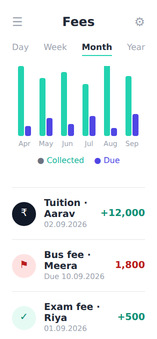
Vidym mobile fee ledger
Notify parents card

Ready to see Vidym with your own classes?

Book a 30-minute demo. We set up a sample school with your classes, fee plans and routes so you can click through it yourself.